




That email sitting in your inbox — the one claiming to be from Facebook, sent from an address ending in facebookmail.com — is it real, or is someone trying to steal your account? Here’s the direct answer: facebookmail.com is a legitimate domain owned and operated by Meta, used specifically to send automated notifications, security alerts, and account emails. So yes, it’s real. But that’s only half the story.
The uncomfortable truth is that legitimate domains can be spoofed. Cybercriminals regularly forge sender addresses to make phishing emails look like they originated from facebookmail.com when they didn’t. Receiving an email from that domain is not, by itself, proof of anything.
Knowing the difference matters. A convincing fake can lead to a hijacked account, stolen personal data, or worse. Below, you’ll find the exact steps to verify any Facebook email, a checklist of red flags that expose fakes, and a recovery plan if you’ve already clicked something suspicious.
What Is facebookmail.com and Is It Really From Facebook?
Yes, facebookmail.com is a legitimate domain owned and operated by Meta Platforms, Inc. Facebook uses it exclusively for outbound notification emails — not as a website you can visit. Receiving an email from this domain does not automatically mean it’s safe, however, because the domain can be spoofed by bad actors.
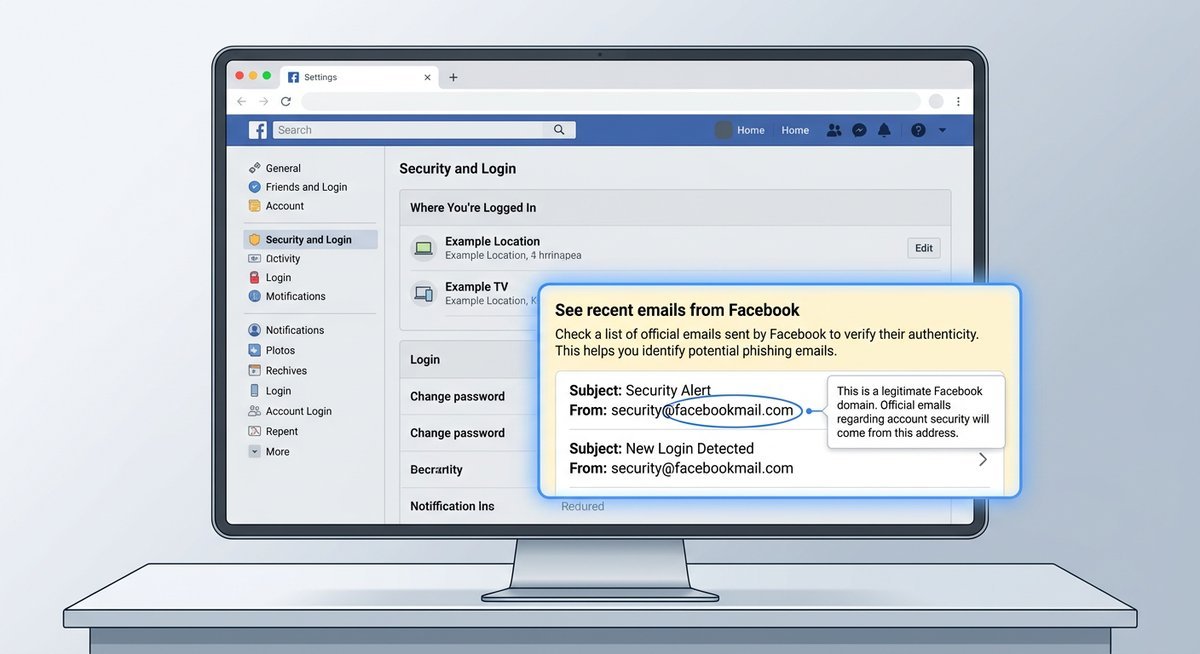
Why Facebook Uses facebookmail.com
Large platforms routinely separate their transactional email infrastructure from their primary website domain. Facebook routes automated notifications — login alerts, password reset requests, account policy notices, friend request updates — through facebookmail.com rather than @facebook.com for a specific technical reason: it allows Meta’s email delivery systems to manage reputation, bounce rates, and spam filtering independently of the main domain.
This is standard practice across the industry. Google sends automated alerts from accounts.google.com, and PayPal uses paypal.com subdomains for transactional mail rather than a single catch-all address. Dedicated sending domains make deliverability more reliable and give security teams a cleaner signal when something goes wrong.
In practice, facebookmail.com has been Facebook’s primary notification-sending domain for well over a decade. The domain is registered to Meta and passes standard email authentication checks — SPF, DKIM, and DMARC — when an email genuinely originates from Facebook’s servers.
Full List of Legitimate Facebook Sender Addresses
No single competitor resource lists every official address in one place — which is exactly the kind of gap that leads people to distrust real Facebook emails or, worse, trust fake ones. Below is a consolidated reference of known legitimate sender addresses across the Meta ecosystem.
| Sender Address | Typical Use |
|---|---|
| security@facebookmail.com | Login alerts, suspicious activity warnings, two-factor authentication notices |
| notification@facebookmail.com | General account notifications — friend requests, comments, tags |
| noreply@facebookmail.com | Automated system messages where no reply is expected |
| update@facebookmail.com | Account updates, policy change notices |
| no-reply@mail.instagram.com | Instagram notifications routed through Meta’s mail infrastructure |
| noreply@fb.com | Shorter-domain variant used for some mobile and Messenger notifications |
| noreply@meta.com | Corporate and Meta-branded communications, Oculus/Quest account notices |
| businesssupport@fb.com | Facebook Business Suite and Ads Manager account communications |
One important distinction: fb.com and meta.com are both legitimate Meta-owned domains, but they serve different purposes than facebookmail.com. Seeing any of these in a sender field is not automatic proof of legitimacy — display names can be faked. The domain in the actual Return-Path header is what counts, and you can only see that by inspecting the message source.
How to Verify an Email Actually Came From Facebook
Facebook gives you a direct way to cross-check any email you’ve received against a log of messages Facebook actually sent your account. If the email in your inbox doesn’t appear in that log, treat it as suspicious — full stop. No guesswork, no relying on how official it looks.
Using Facebook’s “Recent Emails From Facebook” Tool
This is the single most reliable verification method available — and the one almost no one knows about. Facebook maintains a rolling log of every security and notification email it has sent to your account, accessible directly from your settings.
On desktop, follow this exact path:
- Log in to your Facebook account at facebook.com.
- Click the downward arrow (▼) or your profile picture in the top-right corner.
- Select Settings & Privacy, then click Settings.
- In the left-hand menu, click Security and Login.
- Scroll down to the section labelled “See recent emails from Facebook” and click it to expand the log.
- Compare the subject line and timing of the email in your inbox against what appears in that list.
On mobile (iOS or Android):
- Tap the three-line menu icon (≡) in the bottom-right corner on iOS, or top-right on Android.
- Scroll down and tap Settings & Privacy → Settings.
- Tap Password and Security (the mobile equivalent of Security and Login).
- Under the Security Checks section, tap “See recent emails from Facebook.”
If the email you received isn’t listed there, Facebook didn’t send it. That’s the clearest signal you’ll get.
Checking Email Headers for Spoofing
For a deeper check, email headers reveal the actual sending server — not just the display name a scammer can fake. This takes about thirty seconds and works even when a phishing email looks pixel-perfect.
| Email Client | How to View Full Headers | What to Look For |
|---|---|---|
| Gmail | Open email → three-dot menu (⋮) → “Show original” | Return-Path and From domain should end in facebookmail.com |
| Outlook | Open email → File → Properties → Internet headers box | Check Authentication-Results for SPF/DKIM pass |
| Apple Mail | Open email → View menu → Message → All Headers | Confirm Received chain originates from a Meta-owned server |
A legitimate email will show spf=pass and dkim=pass in the Authentication-Results header. If either fails — or if the Return-Path domain doesn’t match facebookmail.com — delete the message. Meta enforces a strict DMARC policy (p=reject), which means most properly configured inboxes already block outright forgeries. The emails that slip through tend to use lookalike domains rather than direct spoofs.
Red Flags: How to Spot a Fake facebookmail.com Email
Most fake facebookmail.com emails fail in predictable ways — wrong sender domain, manufactured urgency, and links pointing nowhere near Facebook’s servers. Spotting even one of these signs is enough to justify deleting the message.
The Red Flag Checklist
Spoofed Facebook emails tend to fail on multiple fronts simultaneously. Rarely does a phishing attempt nail every detail — and that’s precisely where they expose themselves.
| Signal | Legitimate Facebook Email | Suspicious / Fake Email |
|---|---|---|
| Sender address | Ends in @facebookmail.com, @fb.com, or @meta.com | Slight misspellings: @facebokmail.com, @facebookmaiI.com (capital I instead of l) |
| Display name vs. actual address | Display name and sending domain are consistent | Display name says “Facebook Security” but address is a random Gmail or domain |
| Greeting | Uses your full name as registered on your account | Generic: “Dear User,” “Hello Customer,” or no greeting at all |
| Urgency or threat language | Neutral, informational tone | “Your account will be permanently deleted in 24 hours” — pressure tactics designed to bypass rational thinking |
| Links (hover to reveal) | Destination URLs resolve to facebook.com or facebookmail.com | Obfuscated links, URL shorteners, or domains like facebook-security-alert.com |
| Password or payment requests | Facebook never asks for your password via email | Any request for credentials, card numbers, or personal verification |
| Attachments | Facebook notification emails do not include attachments | PDF, .zip, or .exe files — often malware delivery vehicles |
| Grammar and branding | Clean copy, consistent Facebook blue-and-white branding, correct logo | Spelling errors, inconsistent fonts, pixelated logos, or off-brand colour schemes |
What a Real Facebook Email Looks Like vs. a Fake
Authentic Facebook emails are visually clean and structurally predictable. They open with your registered name, use Facebook’s standard blue header, and any call-to-action button links directly to a facebook.com or facebookmail.com URL — something you can confirm by hovering over the link before clicking.
Phishing emails mimic that template but almost always crack under scrutiny. The urgency is the first tell: real Facebook security emails inform you about activity without demanding immediate action under threat. A genuine password-reset email says “You requested a password reset” — not “Your account will be deleted in 24 hours.” If the tone feels like a hostage negotiation, it’s almost certainly fake.
Another dead giveaway: hover over any button or link in the email. On desktop, the destination URL appears in the bottom-left corner of your browser or email client. Legitimate Facebook emails link exclusively to facebook.com or fb.com domains. Anything else — especially shortened URLs, unfamiliar domains, or addresses with extra hyphens like “facebook-security-verify.com” — is a phishing attempt.
What to Do If You Clicked a Suspicious Link — Recovery Steps
Clicking a suspicious link doesn’t automatically mean your account is compromised — but the window to limit damage is short. Act within the first 30 minutes and you can likely contain the threat before any real harm is done.
Immediate Steps to Take Right Now
Order matters. Changing your password before closing the phishing tab, for instance, could expose your new credentials to the same keylogger. Work through these steps in sequence:
- Stop entering information immediately. Close the tab or browser window without submitting anything. If you’ve already typed a password or payment detail, assume it’s been captured.
- Change your Facebook password right now. Go directly to facebook.com — type it manually, don’t click any link — then navigate to Settings & Privacy → Settings → Security and Login → Change Password.
- Enable two-factor authentication (2FA). Even if your password was stolen, 2FA blocks an attacker from completing a login. Find this under Settings → Security and Login → Two-Factor Authentication.
- Review active sessions. On the same Security and Login page, scroll to “Where You’re Logged In.” Terminate any session you don’t recognise.
- Check connected apps and email address. Attackers sometimes change the recovery email before locking you out. Verify yours is still correct under Settings → General → Contact.
- Run a malware scan. If the link prompted a download or redirect, scan your device using reputable security software before doing anything else online.
- Report the email to Facebook. Forward the suspicious message to phish@fb.com — Meta’s dedicated phishing report address — so the domain can be investigated and flagged.
| What You Did | Immediate Priority |
|---|---|
| Clicked the link but entered nothing | Run a malware scan; monitor account activity for 48 hours |
| Entered your Facebook password | Change password and enable 2FA within minutes |
| Entered payment or personal details | Contact your bank immediately; file a report with the FTC at reportfraud.ftc.gov |
The Federal Trade Commission’s Consumer Sentinel Network Data Book (2024) ranks phishing as one of the top reported fraud contact methods, with social media impersonation among the fastest-growing subcategories. Speed matters: the FTC notes that consumers who act within 48 hours of a phishing incident recover lost access far more often than those who wait.
Frequently Asked Questions
Is facebookmail.com a legitimate email address from Facebook?
Yes. facebookmail.com is an official domain owned by Meta Platforms, Inc., used exclusively for sending automated notifications, security alerts, and account-related emails. It is not a website — you cannot visit facebookmail.com in a browser. However, scammers can spoof the sender address, so receiving an email from this domain is not proof of legitimacy on its own. Always verify through Facebook’s “Recent Emails” tool in your Security and Login settings.
How can I tell if an email from facebookmail.com is real or a scam?
The fastest method: log into Facebook, go to Settings & Privacy → Settings → Security and Login → “See recent emails from Facebook.” If the email appears in that log, Facebook sent it. If it doesn’t, treat it as suspicious. For a technical check, view the email headers and confirm the Return-Path domain is facebookmail.com and that SPF/DKIM authentication passed.
What does a Facebook phishing email look like?
Phishing emails impersonating Facebook typically use urgent language (“Your account will be deleted in 24 hours”), generic greetings (“Dear User”), and links that point to domains other than facebook.com or fb.com. They may also request passwords, payment details, or personal information directly — something Facebook never does via email. Misspelled sender domains like @facebokmail.com or @facebookmaiI.com (with a capital I) are another common giveaway.
What should I do if I clicked a link in a suspicious Facebook email?
Close the browser tab immediately without entering any information. Then change your Facebook password by navigating directly to facebook.com, enable two-factor authentication, and review your active login sessions under Security and Login. If you entered payment details, contact your bank. Forward the suspicious email to phish@fb.com so Meta can investigate.
Why does Facebook use facebookmail.com instead of @facebook.com?
Large platforms separate transactional email infrastructure from their primary domains. Routing notifications through a dedicated sending domain like facebookmail.com allows Meta to manage email deliverability, bounce rates, and spam filtering independently. Google, PayPal, and other major services follow the same practice.
Is security@facebookmail.com safe?
security@facebookmail.com is a real address Facebook uses for login alerts, suspicious activity warnings, and two-factor authentication notices. That said, scammers frequently spoof this exact address. The sender field alone is not sufficient proof — always cross-reference with Facebook’s built-in email log or inspect the email headers to confirm authentication passed.
Protecting Your Account Going Forward
facebookmail.com is a real Meta domain, and most emails from it are genuine. The risk isn’t the domain itself — it’s the assumption that a familiar sender name guarantees safety. Spoofed emails exploit exactly that shortcut.
Three habits eliminate most of the risk: check Facebook’s email log before acting on any security email, hover over links before clicking them, and keep two-factor authentication enabled at all times. Do those consistently, and phishing emails become obvious rather than dangerous.