



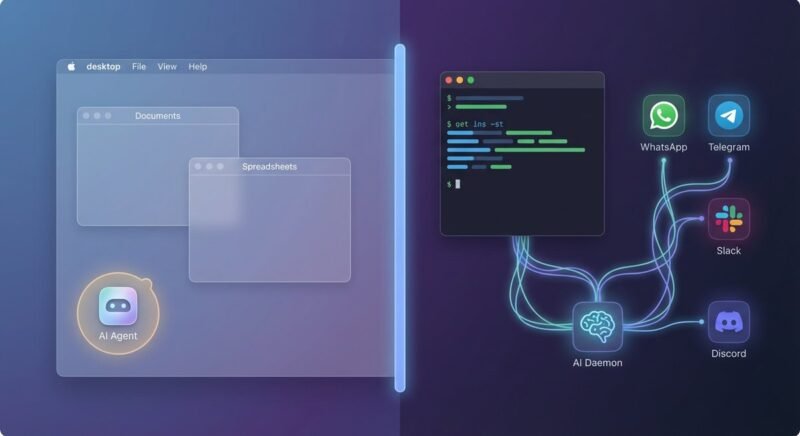
Anthropic’s Claude Cowork and the open-source OpenClaw project solve different problems for different people. Cowork is a sandboxed desktop agent that handles documents, spreadsheets, and file management inside a controlled macOS environment. OpenClaw is a self-hosted daemon that connects AI to WhatsApp, Telegram, Slack, and dozens of other services around the clock. Picking between them depends less on which is “better” and more on whether your bottleneck is thinking or doing.
Cowork launched on January 12, 2026, initially limited to Anthropic’s Max subscribers before opening to all Pro plan users on January 16. OpenClaw, originally named Clawdbot and briefly Moltbot, has been growing through open-source contributions under an MIT license and now powers more than 50 integrations with a community marketplace (ClawHub) listing over 3,000 extensions. The gap between these tools is architectural, not incremental.
Quick Decision: Two Questions That Tell You Which to Pick
Most people can sort themselves in under 30 seconds. Answer two questions and the recommendation falls out naturally.
- Do you need your AI agent running 24/7 without you at the keyboard? If yes, OpenClaw is the only option — Cowork requires the desktop app open and a user present. If no, Cowork’s controlled environment is simpler and safer.
- Can you manage a Linux server, configure API keys, and harden a public-facing service? If yes, OpenClaw gives you maximum power. If no, Cowork works out of the box with zero infrastructure.
Both questions point to Cowork? Start there. Both point to OpenClaw? You already know. Mixed answers? Read the architecture and pricing sections below — the nuances will break the tie.
Architecture and Core Design: Desktop Agent vs. Always-On Daemon
Claude Cowork runs as a sandboxed desktop agent inside Anthropic’s Claude Desktop app, currently available only on macOS. It uses Apple’s Virtualization Framework to isolate file access, meaning Cowork can only touch folders you explicitly grant permission to. According to Anthropic’s product page, the tool is designed “around the outcome” — you describe what you need done, and Cowork executes multi-step workflows autonomously within that sandbox.
OpenClaw takes the opposite approach. It runs as a persistent daemon on your own machine or a VPS, operating 24/7 as a gateway between your messaging apps and one or more large language models. According to the official OpenClaw documentation, the platform connects WhatsApp, Telegram, Discord, iMessage, Signal, and Slack to AI agents that can browse the web, manage email, schedule calendar events, summarize PDFs, and control smart home devices.
| Dimension | Claude Cowork | OpenClaw |
|---|---|---|
| Architecture | Sandboxed desktop agent (macOS) | Self-hosted daemon (any OS) |
| Model support | Claude models only (Opus, Sonnet, Haiku) | Model-agnostic: OpenAI, Anthropic, Google, local via Ollama |
| Channels | Desktop app + Chrome extension | WhatsApp, Telegram, Slack, Discord, iMessage, Signal |
| Persistence | Session-based (no persistent memory on Pro) | Persistent memory across sessions |
| File access | Granted folders only, sandboxed | Full system access on host machine |
| Extensions | MCP plugins (productivity, sales, marketing) | ClawHub marketplace: 3,000+ community skills |
| Open source | No (proprietary) | Yes (MIT license) |
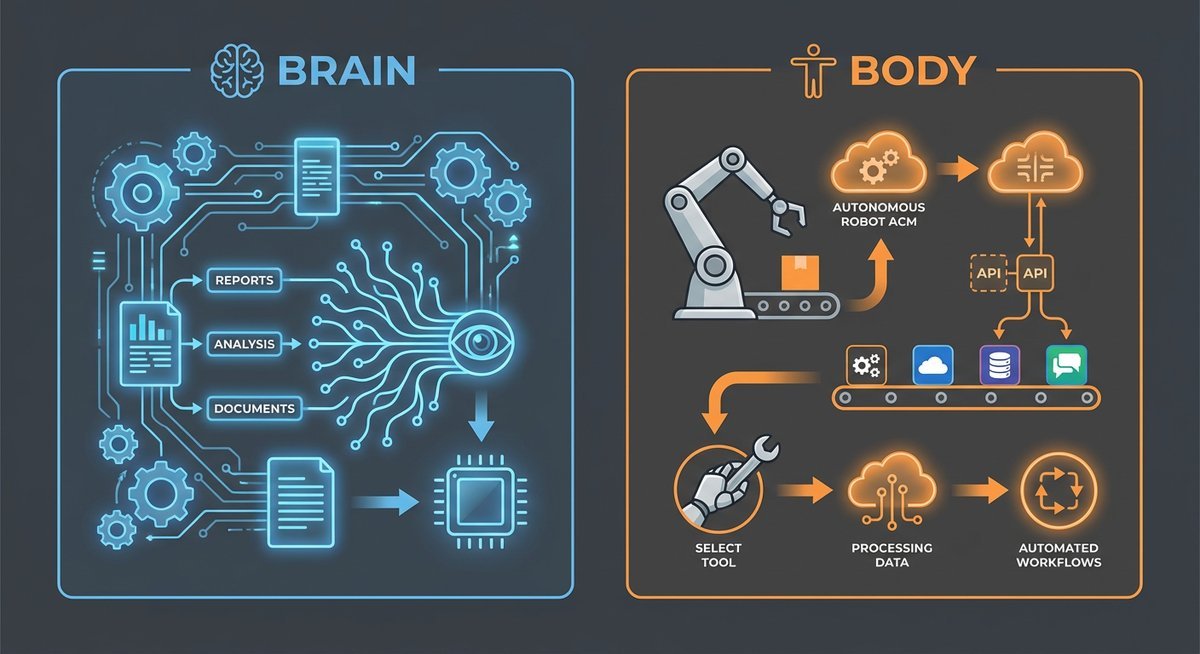
The practical upshot: Cowork is a controlled environment where a powerful LLM handles your documents and files with guardrails. OpenClaw is an unrestricted agent runtime where you trade safety rails for flexibility and 24/7 availability. Both architectures have sharp trade-offs that show up most clearly in security and cost.
Pricing: What You Actually Pay Each Month
Claude Cowork costs between $20 and $200 per month depending on your Anthropic subscription tier, with no infrastructure to manage. OpenClaw’s software is free, but hosting and API costs range from $0 to well over $200 monthly depending on usage intensity. According to SentiSight’s January 2026 analysis, the cost equation flips depending on your workflow volume and technical ability.
Claude Cowork Subscription Tiers
Anthropic opened Cowork access to Pro subscribers ($20/month) on January 16, 2026. Previously it was exclusive to Max plan users. The Max plan comes in two tiers: Max 5x at $100/month and Max 20x at $200/month. All tiers unlock identical Cowork features — the price difference buys more usage capacity, measured in messages and context.
A single Cowork task can consume dozens of messages due to its multi-step execution. Pro users hit rate limits noticeably faster during extended sessions, particularly with document-heavy workflows. Anthropic offers an “Extra Usage” option that switches billing to per-token API rates once you exceed your quota. Max subscribers also get priority access during peak times and early access to new features.
OpenClaw: Free Software, Variable Infrastructure Costs
OpenClaw itself costs nothing — it’s MIT-licensed open-source software hosted on GitHub. The actual costs come from two sources: hosting and LLM API calls.
According to a detailed cost guide by Wenhao Yu (February 2026), a basic personal setup using Oracle Cloud’s free ARM tier with Gemini 2.5 Flash can run at $0/month. More typical setups use a Hetzner CAX11 VPS at roughly $4/month or AWS Lightsail at $13/month, then add API costs on top.
| Usage Profile | Claude Cowork Monthly Cost | OpenClaw Monthly Cost |
|---|---|---|
| Light (simple automations) | $20 (Pro plan) | $0-13 (hosting) + $6 (API) = $6-19 |
| Moderate (daily active use) | $100 (Max 5x) | $4-13 (hosting) + $30-80 (API) = $34-93 |
| Heavy (multi-agent workflows) | $200 (Max 20x) | $13+ (hosting) + $100-200+ (API) = $113-213+ |
| Unmonitored/runaway usage | Capped by plan + Extra Usage | Reported cases up to $3,600/month |
Tools like ClawRouter and prompt caching can reduce OpenClaw API costs by up to 80%, according to community benchmarks. Routing routine tasks to cheaper models (GPT-OSS-120B at $0.039 per 1M input tokens) while reserving premium models for complex reasoning is a common cost optimization strategy. For users who want to skip infrastructure management, managed OpenClaw hosting services range from $0.99 to $129/month.
Security and Privacy: Two Very Different Risk Profiles
Security is where the gap between these tools becomes most consequential. Anthropic’s sandboxed approach and OpenClaw’s full-system-access model produce fundamentally different threat surfaces, and both have documented vulnerabilities that prospective users need to weigh carefully.
Claude Cowork’s Sandbox — Strong but Not Bulletproof
Cowork’s sandboxed design restricts file access to explicitly granted folders and prevents arbitrary system commands. According to Anthropic, the tool remains in “research preview” with “agent safety still in development.” That caveat proved prescient: security firm PromptArmor discovered a prompt injection vulnerability within 48 hours of Cowork’s launch that could “silently exfiltrate confidential files.” Adapt’s analysis notes the vulnerability was disclosed to Anthropic three months before launch but remained unpatched as of late January 2026.
Cowork also lacks enterprise-grade audit logs, a compliance API, and data export functionality — gaps that matter for regulated industries. For individual knowledge workers handling non-sensitive documents, the sandbox model provides meaningful protection. For teams with compliance requirements, the current feature set falls short.
OpenClaw’s Open Architecture — Powerful but Exposed
OpenClaw’s security record is rougher. A Gartner assessment described the platform as “insecure by default” with “unacceptable cybersecurity risks.” CrowdStrike released a dedicated OpenClaw removal tool in February 2026 after researchers found over 30,000 exposed OpenClaw instances on the public internet between January and February 2026. Trend Micro documented real-world breaches involving compromised instances, and Snyk found that 7.1% of ClawHub marketplace skills leak credentials.
NVIDIA responded by partnering with the OpenClaw community on NemoClaw, which applies policy-based privacy and security guardrails through the NVIDIA Agent Toolkit. Still, the project’s creator has publicly stated that “most non-techies should not install this.” OpenClaw demands genuine infrastructure security expertise to operate safely.
Use Cases: Who Should Pick What?
Claude Cowork wins for desktop knowledge work: organizing files, generating documents (DOCX, XLSX, PPTX, PDF), batch file conversion, image compression, and research synthesis across multiple sources. A Reddit user on r/ClaudeAI summarized the split concisely: “For non-technical people and small teams, Cowork solves 80% of automation needs with 20% of the complexity.”
OpenClaw wins for always-on automation: scheduled tasks via cron jobs, multi-channel messaging, webhook-driven workflows, browser control, and integration-heavy pipelines. Developers running AI-assisted DevOps, automated customer responses across messaging platforms, or complex multi-agent orchestration chains find OpenClaw’s unrestricted runtime essential.
| Role | Primary Need | Best Fit | Why |
|---|---|---|---|
| Knowledge worker | Document management, research | Claude Cowork | Sandboxed, no setup, polished UX |
| Solo developer | 24/7 automation across services | OpenClaw | Full system access, persistent memory |
| Ops team | Multi-channel workflow automation | OpenClaw | WhatsApp/Slack/Telegram integration |
| Content professional | Drafting, editing, file batch processing | Claude Cowork | Claude’s strong language reasoning |
| Enterprise team | Secure AI with compliance needs | Claude Cowork (with caveats) | Sandbox model, but lacks audit logs |
| Power user / builder | Maximum flexibility, custom integrations | OpenClaw | 3,000+ ClawHub skills, MIT license |
A growing number of teams run both tools together. Claude handles the reasoning-heavy work — analysis, writing, decision support — while OpenClaw handles the execution layer: deploying outputs, triggering workflows, and maintaining persistent connections to external services. As the rentamac.io comparison put it: “Claude has a CLI, a desktop agent, and a 1M token brain. But it can’t run 24/7 or text you on WhatsApp.”
Can You Run Both Together?
Yes, and the combination is arguably stronger than either tool alone. Claude Cowork excels at reasoning — synthesizing information, drafting complex documents, evaluating trade-offs. OpenClaw excels at execution — running scheduled tasks, managing cross-platform communications, and maintaining persistent agent state.
The practical pattern looks like this: Claude Cowork processes and analyzes your data, generates structured outputs, and handles nuanced language tasks. OpenClaw picks up those outputs and deploys them — posting to Slack, updating CRM records via webhooks, scheduling follow-up actions, or routing information across messaging channels. The “brain plus body” metaphor that multiple reviewers use is accurate: Claude thinks, OpenClaw acts.
Cost-wise, this dual setup runs roughly $20-100/month for Cowork plus $10-50/month for a modest OpenClaw instance — a $30-150 monthly total that many professionals and small teams find reasonable for genuine productivity gains.
Getting Started: What Setup Actually Looks Like
Onboarding friction is a real cost that comparison tables tend to ignore. Claude Cowork takes minutes to set up; OpenClaw can take hours or days depending on your infrastructure experience.
How to Set Up Claude Cowork
Download the Claude Desktop app from claude.com/download, sign in with a Pro or Max account, and grant Cowork access to the folders you want it to manage. That’s it. No terminal, no Docker, no API keys to configure. The entire process takes under five minutes, and Cowork’s sandboxed permissions mean you can experiment without risking system-level damage. Anthropic also offers a Chrome extension for browser-based tasks, installable with one click.
How to Set Up OpenClaw
OpenClaw requires a server environment — your own machine, a VPS, or a managed hosting service. The standard installation involves cloning the GitHub repository, configuring environment variables for your chosen LLM provider, setting up messaging platform integrations (each with its own API key and webhook configuration), and securing the instance against public exposure. Community tutorials estimate 45 minutes to two hours for a first-time deployment, assuming comfortable with Node.js and Docker.
For non-technical users, managed hosting services like DigitalOcean’s 1-Click OpenClaw Deploy offer a faster path — but you still need to configure messaging integrations and LLM API keys yourself. The official documentation is thorough, and the community Discord provides real-time support, but the learning curve is real.
Frequently Asked Questions
Is Claude Cowork or OpenClaw free to use?
OpenClaw is free and open-source under the MIT license, though you pay for hosting ($0-13/month) and LLM API calls ($6-200+/month depending on usage). Claude Cowork requires a paid Anthropic subscription starting at $20/month for the Pro plan, with Max tiers at $100 and $200/month for higher usage capacity.
Does Claude Cowork work on Windows?
Not yet. Claude Cowork is currently macOS-only. Anthropic has indicated a Windows version is planned, but no release date has been announced as of March 2026. OpenClaw runs on any operating system that supports Node.js, including Windows, macOS, and Linux.
Can OpenClaw use Claude models?
Yes. OpenClaw is model-agnostic and supports Claude models through Anthropic’s API alongside OpenAI, Google, and local models via Ollama. You can route different tasks to different models — using cheaper models for routine work and Claude Opus for complex reasoning — to optimize costs.
Is OpenClaw safe to use?
OpenClaw requires genuine security expertise to deploy safely. Gartner assessed it as “insecure by default,” and CrowdStrike found over 30,000 exposed instances on the public internet in early 2026. NVIDIA’s NemoClaw project adds security guardrails, and following the official hardening documentation significantly reduces risk — but this is not a tool for users unfamiliar with server security.
Which tool is better for enterprise teams?
Claude Cowork’s sandboxed architecture and Anthropic’s managed infrastructure make it the safer default for enterprise environments, though it currently lacks audit logs and compliance APIs. OpenClaw offers more flexibility but requires dedicated security resources to meet enterprise standards. Teams with strict data sovereignty requirements may prefer OpenClaw’s self-hosting model paired with NemoClaw guardrails.
Does Claude Cowork have persistent memory?
The Max plan includes persistent memory and cross-conversation context. The Pro plan ($20/month) operates on a session basis without persistent memory, and Cowork tasks are subject to a 5-hour rolling usage window that resets periodically.
Which is better for non-technical users?
Claude Cowork, without question. It requires no installation beyond the Claude Desktop app, no server management, no API key configuration, and no security hardening. OpenClaw’s creator has publicly stated that “most non-techies should not install this.” Cowork’s point-and-click sandbox is designed specifically for knowledge workers without technical backgrounds.