




FreeTube hit 15,000 GitHub stars in early 2025, making it the most popular open-source desktop YouTube client by a wide margin. The appeal is straightforward: watch YouTube without ads, without a Google account, and without your viewing history being fed into Google’s ad-targeting machine. Everything stays on your hard drive.
Available for Windows, macOS, and Linux, FreeTube is an Electron-based desktop app licensed under AGPLv3. It pulls video data from YouTube through two switchable API modes — Local API for speed, Invidious API for IP-level anonymity — and never touches Google’s login or tracking infrastructure during normal use.
What Is FreeTube and How Does It Work?
FreeTube runs as a standalone desktop app — not a browser extension, not a website wrapper, but a self-contained Electron application with its own interface, settings, and local database. YouTube’s JavaScript tracking code, ad delivery scripts, and cookie mechanisms never execute during playback. That architectural separation is what makes the privacy guarantees enforceable rather than aspirational.
The Core Concept
The application was created by developer Ethan Martin and is maintained on GitHub under the AGPLv3 open-source license. FreeTube pulls video data, thumbnails, comments, and channel information from YouTube — but does so in a way that prevents Google from associating that activity with a user profile or serving targeted ads.
Crucially, FreeTube is not a browser extension layered on top of YouTube’s web interface. It is a self-contained application, which means YouTube’s JavaScript tracking code, ad delivery scripts, and cookie mechanisms never execute in the traditional sense. Your subscriptions, watch history, and saved playlists live entirely on your own device.
Local API vs. Invidious API
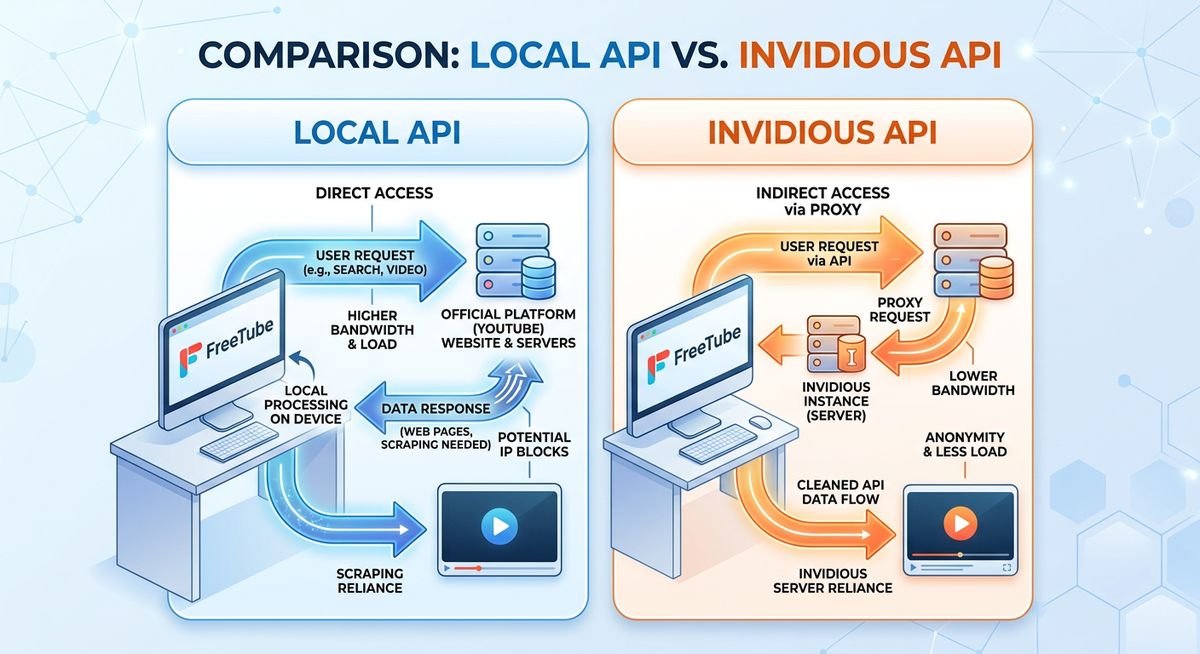
FreeTube operates in one of two modes, and the distinction matters more than most users realize. The Local API mode fetches data directly from YouTube’s internal endpoints — the same undocumented APIs YouTube’s own apps use — without routing traffic through any third-party server. Requests go from your machine to YouTube’s servers, period.
The Invidious API mode takes a different approach. Invidious is a separate open-source YouTube front-end project; when FreeTube uses this mode, it routes requests through a community-run Invidious instance, which acts as a privacy-respecting proxy between you and YouTube. Google sees the proxy server’s IP address, not yours.
| Feature | Local API | Invidious API |
|---|---|---|
| Data route | Direct to YouTube endpoints | Through Invidious proxy server |
| Your IP visible to Google | Yes | No (proxy masks it) |
| Speed | Generally faster | Depends on instance load |
| Third-party dependency | None | Requires a live Invidious instance |
| Best for | Reliability and speed | Maximum IP-level privacy |
In practice, Local API is the default and works reliably for most users. Invidious API is the better choice for anyone who wants an additional layer of anonymity — particularly users on shared networks or those in regions with aggressive data retention laws — though it introduces a dependency on third-party server uptime.
Privacy and Safety — Is FreeTube Trustworthy?
FreeTube collects zero personal data, sends no information to Google, and stores everything — subscriptions, watch history, saved playlists — exclusively on your own device. For users migrating away from browser-based YouTube, that single fact represents a fundamental shift in how their viewing habits are handled. The short answer to whether FreeTube is trustworthy: yes, and the evidence is publicly auditable.
Open-Source Transparency
FreeTube’s complete source code is published on GitHub under the GNU Affero General Public License v3 (AGPLv3) — one of the strongest copyleft licenses available. That means any developer, security researcher, or curious power user can read every line, flag every function, and verify exactly what the application does before running it. No black boxes, no proprietary binaries hiding network calls.
The project has accumulated hundreds of contributors and thousands of GitHub stars, with an active issue tracker and regular pull request activity. A dormant or suspicious project doesn’t maintain that kind of community engagement. The AGPLv3 license also requires that any modified version distributed publicly must itself remain open-source — closing off a common vector for malicious forks.
What FreeTube Never Collects
The privacy guarantees here are structural, not just policy promises. FreeTube never requires a Google account. No authentication token is ever exchanged with Google’s servers during normal use.
Watch history, search queries, and channel subscriptions never leave the local machine — they’re written to a flat database file stored in the user’s application data folder. There are no ad-tracking pixels, no third-party analytics SDKs embedded in the app, and no cookies shared with YouTube’s servers. Compare that to watching YouTube in Chrome or Firefox, where Google’s tracking infrastructure is fully active regardless of browser privacy settings.
| Data Point | YouTube in Browser | FreeTube (Local API) | FreeTube (Invidious API) |
|---|---|---|---|
| Google account required | Optional but heavily prompted | No | No |
| Watch history sent to Google | Yes (if signed in) | No | No |
| Ad-tracking pixels | Yes | No | No |
| Cookies shared with YouTube | Yes | No | No |
| Subscription data stored | Google’s servers | Local device only | Local device only |
| Requests routed through third party | No | No | Yes (Invidious instance) |
Community Safety Verdict
Across Linux forums, privacy-focused Reddit communities like r/privacy and r/degoogle, and open-source advocacy spaces, FreeTube consistently ranks among the most recommended YouTube alternatives. Users who have inspected network traffic report that the app makes no unexpected outbound connections beyond YouTube or a configured Invidious instance. The Electronic Frontier Foundation (EFF) has cited open-source YouTube clients as a practical step toward reducing corporate surveillance, and FreeTube fits that description precisely.
One reasonable concern: Electron-based apps bundle a Chromium runtime, which is a Google-originated project. Users weighing FreeTube against other options will find the privacy and feature comparison between FreeTube, NewPipe, and Invidious useful for making an informed choice. FreeTube strips out Google’s telemetry and syncing services from that runtime, but users who want zero Google-adjacent code on their machine should note this architectural dependency. For most privacy-focused users, the trade-off is acceptable — the actual data exposure is negligible compared to using YouTube directly.
Platform Availability and Download Guide
FreeTube runs natively on Windows, macOS, and Linux — with pre-built binaries for each platform available directly on the official GitHub releases page at github.com/FreeTubeApp/FreeTube/releases. The complete download and installation walkthrough covers every platform with exact commands, but here’s the overview.
Windows Installation
The standard Windows download is a .exe installer — double-click, follow the prompts, done. Both 64-bit (x64) and ARM64 builds are published on the GitHub releases page, which matters for users running Windows on ARM-based hardware like the Microsoft Surface Pro X or Snapdragon-powered laptops.
For users who work on managed machines or simply prefer not to run an installer, FreeTube also ships a portable .zip archive. Extract it anywhere — a USB drive, a folder on the desktop — and launch the executable directly. No registry entries, no administrator permissions required. This is the freetube portable use case that most coverage ignores entirely.
macOS Installation
Mac users get a standard .dmg file, with separate builds for Intel Macs and Apple Silicon (M1, M2, M3, and M4 series). Download the correct architecture variant — the GitHub releases page labels them clearly as x64 for Intel and arm64 for Apple Silicon.
On first launch, macOS Gatekeeper will likely block the app with a warning that FreeTube “cannot be opened because the developer cannot be verified.” This is expected behavior for apps distributed outside the Mac App Store. To resolve it, open System Settings → Privacy & Security, scroll to the security section, and click Open Anyway next to the FreeTube entry.
Linux Installation
Linux users have three solid installation paths, each suited to different preferences and distributions.
- AppImage — A single self-contained file that runs on virtually any Linux distro without installation. Mark it executable (
chmod +x FreeTube*.AppImage) and launch it. - Flatpak via Flathub — The recommended option for most desktop Linux users. Sandboxed, automatically updated, and available across Fedora, Ubuntu, Arch, and others.
- .deb / .rpm packages — Native packages for Debian/Ubuntu (
.deb) and Fedora/RHEL (.rpm) users who prefer system-level integration.
The one-line Flatpak install command:
flatpak install flathub io.freetubeapp.FreeTube| Linux Method | Best For | Auto-Updates |
|---|---|---|
| AppImage | Any distro, no install | Manual |
| Flatpak (Flathub) | Most desktop distros | Yes |
| .deb / .rpm | Debian, Ubuntu, Fedora | Via package manager |
Homebrew and Other Methods
macOS and Linux users who prefer package managers have additional options. On macOS, brew install --cask freetube handles the entire installation through Homebrew. Arch Linux users can find FreeTube in the AUR. For Chromebook users running Linux (Crostini), the Flatpak or AppImage routes both work — just enable the Linux development environment in ChromeOS settings first.
Steam Deck owners can install FreeTube through Flatpak in Desktop Mode. The controller support is limited (it is fundamentally a keyboard-and-mouse app), but the Deck’s trackpads handle navigation well enough for casual viewing sessions.
Key Features That Make FreeTube Stand Out
FreeTube ships with a surprisingly complete feature set for a privacy tool — subscriptions, watch history, playlists, and channel management all work without a Google account, storing everything locally in a JSON-based database on the user’s own machine. No cloud sync, no server handshake, no data leaving the device.
The built-in SponsorBlock integration is a standout addition. FreeTube can automatically skip sponsored segments, self-promotion, and filler intros using community-sourced timestamps — a layer of filtering that goes beyond simple ad removal.
| Feature | Details |
|---|---|
| Ad blocking | No ads served — YouTube’s ad delivery is bypassed entirely at the API level |
| SponsorBlock | Community-driven segment skipping (sponsors, intros, outros, self-promo) |
| Local data storage | Subscriptions, history, and playlists saved in a local database file |
| Dual API modes | Switch between Local API and Invidious API per session |
| Playback quality control | Manual resolution selection up to 4K where available |
| Import/export | Migrate subscriptions from YouTube or Invidious via OPML or CSV |
| Themes | Light, dark, black, and system-default UI themes |
The subscription import feature deserves particular mention. Users can pull their existing YouTube subscription list directly into FreeTube via Google Takeout export — no manual re-following required. The full process of importing subscriptions, configuring SponsorBlock, and setting up external players takes under ten minutes. Switching from YouTube to FreeTube takes minutes, not hours.
In practice, the dual API toggle is more useful than it sounds. When YouTube’s internal endpoints throttle or break (which happens after major YouTube updates), flipping to an Invidious instance keeps playback running while the FreeTube team pushes a fix.
External player support rounds out the feature set. Users can pipe video playback to VLC, mpv, or any compatible media player directly from FreeTube’s interface — useful for hardware-accelerated decoding on older machines or for casting content to other devices. DeArrow integration, added in recent builds, replaces clickbait thumbnails and titles with community-submitted alternatives.
Frequently Asked Questions
What is the official FreeTube website and download URL?
The official FreeTube website is freetubeapp.io, and the safest download source is the GitHub releases page at github.com/FreeTubeApp/FreeTube/releases. Avoid third-party download sites like Softonic or CNET Downloads — they sometimes bundle additional software or outdated versions. The official site links directly to GitHub for all platforms.
What is the current FreeTube version?
FreeTube follows a rolling release cycle with version numbers like 0.22.x. Check the GitHub releases page for the latest stable build — nightly development builds are also available for users who want bleeding-edge features. The app does not auto-update; you need to download new versions manually or use a package manager like Flatpak or Homebrew that handles updates.
Does FreeTube have a web version or browser extension?
No. FreeTube is a desktop-only application — there is no web version, no browser extension, and no Chrome extension. Users looking for a browser-based YouTube alternative should consider Invidious (web frontend) or the LibRedirect extension, which automatically redirects YouTube links to privacy-friendly frontends. For mobile and smart TV options, the FreeTube mobile and TV alternatives guide covers what works on Android, iOS, Roku, and Fire TV.
Is FreeTube safe, or is it a virus?
FreeTube is safe. It is fully open-source under the AGPLv3 license, meaning anyone can audit the code. Windows Defender and some antivirus tools occasionally flag Electron-based apps as suspicious — this is a false positive caused by heuristic detection, not actual malware. Downloading exclusively from the official GitHub releases page eliminates supply chain risk.
Can FreeTube run from the command line?
Yes. On Linux, launch FreeTube with freetube or ./FreeTube*.AppImage from terminal. The app accepts a YouTube URL as a command-line argument to open a specific video directly. On Windows, the portable version can be launched from PowerShell or Command Prompt using the full path to the executable.
Where can I find the FreeTube logo and icon?
The FreeTube logo — a red play button inside a shield shape — is available in the project’s GitHub repository under the assets directory. PNG, SVG, and ICO formats are included. The icon files are licensed under the same AGPLv3 terms as the main application.
Does FreeTube support RSS feeds?
FreeTube can import subscriptions from RSS/OPML files exported by other YouTube clients or feed readers. Channel subscriptions within FreeTube function similarly to RSS — checking for new uploads at configurable intervals without requiring a YouTube account or API key.
Where FreeTube Goes From Here
YouTube’s ongoing battle against third-party clients — rate-limiting API access, requiring authentication for more endpoints, and occasionally blocking IP ranges — means FreeTube’s stability fluctuates. When playback breaks, the fixes for common FreeTube errors including 403 blocks and API failures are usually straightforward. The project has weathered every crackdown so far by adapting quickly, but the arms race is real and ongoing.
For users who care about watching YouTube without feeding the surveillance machine, FreeTube remains the strongest desktop option available. The dual API architecture, local-only data storage, and active open-source community give it a resilience that closed-source alternatives cannot match. Grab the latest build from GitHub, import your subscriptions, and reclaim your viewing habits.