




You’ve got two weeks off, a passport, and approximately forty-seven browser tabs open. Sound familiar? Trip planning has never been more powerful — or more paralyzing. The sheer number of tools, booking platforms, and “must-have” app recommendations floating around the internet makes it genuinely hard to know where to start.
The best travel apps for planning aren’t the most popular ones. They’re the ones that match how you travel — whether you’re splitting costs across a group of six, navigating a remote trail with no cell signal, or tracking every euro on a tight backpacker budget.
This guide cuts through the noise. Rather than recycling the same generic app list you’ve seen a dozen times, it organizes recommendations by category and traveler type — covering everything from itinerary builders and flight trackers to offline maps, real-time expense tools, group planning apps, and safety resources that most guides completely ignore.
Find what you actually need. Pack lighter. Travel smarter.
The Best Travel Planning Apps by Category
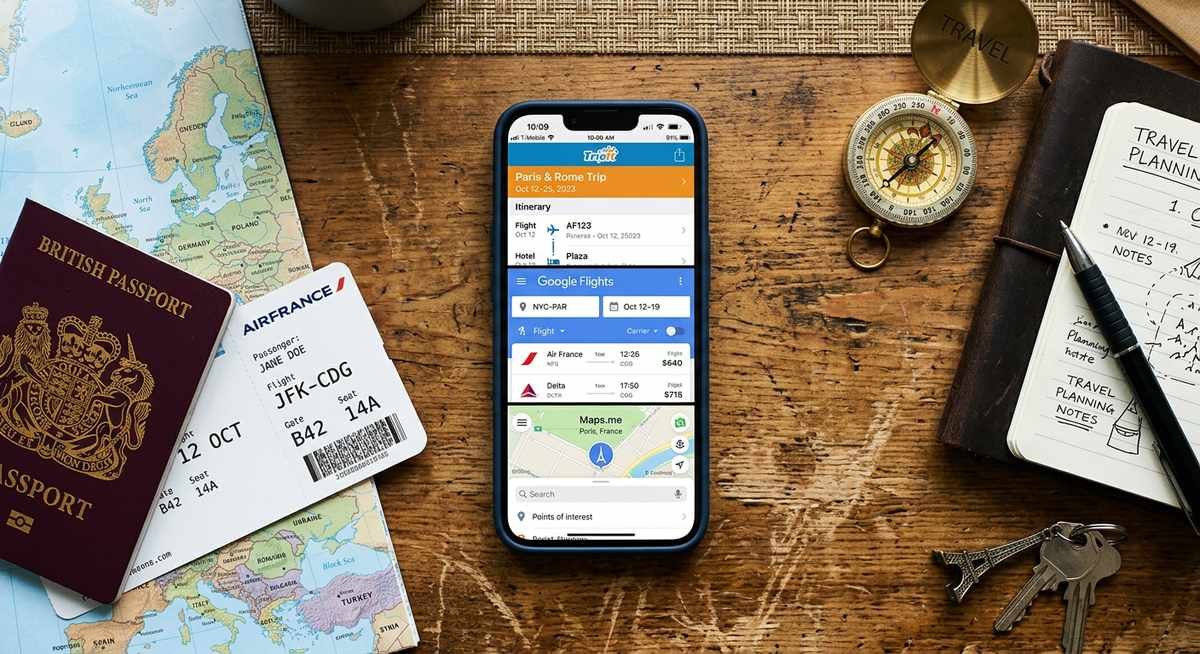
The best travel planning apps by category are: TripIt or Wanderlog for itinerary building, Google Flights or Hopper for booking, and Maps.me or Google Maps for navigation. Using one strong app per category — rather than one bloated all-in-one tool — gives you a more reliable, flexible planning stack that holds up whether you have full Wi-Fi or zero signal.
Itinerary & Organization Apps
TripIt remains one of the smartest organizational tools available for travelers. Forward any confirmation email — flights, hotels, car rentals, restaurant reservations — to plans@tripit.com, and TripIt automatically parses and assembles a master itinerary in chronological order. No manual data entry required.
The free tier handles the basics well. TripIt Pro, which runs around $49/year, unlocks real-time flight alerts, seat-tracking, and refund notifications — genuinely useful features if you travel more than three or four times a year, but overkill for a single annual trip.
One real limitation: TripIt’s collaboration features are thin compared to Wanderlog, which lets multiple travelers co-edit a shared itinerary, vote on activities, and visualize the entire route on an interactive map. The smartest pairing is TripIt for automated email imports and Wanderlog as the shared planning canvas everyone on the trip can actually touch.
Flight & Hotel Booking Apps
Google Flights is the power tool most travelers underuse. The flexible-date calendar view displays a full month of fares at once, making it easy to spot the cheapest travel window without manually checking dates one by one. For anyone with flexibility, this single feature can save hundreds of dollars.
Hopper’s price-prediction engine adds a different kind of value — it analyzes historical pricing data to forecast whether a fare will rise or fall, then tells you to book now or wait. The real story is that Hopper’s “wait” recommendation is most reliable on routes with predictable demand patterns; on niche or international routes with thin data, treat its advice as a signal rather than a guarantee.
Skyscanner earns its place as a cross-platform aggregator that covers budget carriers Google Flights sometimes misses. Using all three in combination — Google Flights for date flexibility, Hopper for timing confidence, Skyscanner for budget-carrier coverage — takes less than ten minutes and covers virtually every pricing angle.
| App | Best For | Standout Feature | Free? |
|---|---|---|---|
| Google Flights | Flexible-date searching | Monthly fare calendar view | Yes |
| Hopper | Booking timing decisions | Price-prediction with buy/wait alerts | Yes (in-app purchases) |
| Skyscanner | Budget carrier discovery | Searches low-cost carriers broadly | Yes |
| TripIt | Itinerary consolidation | Auto-import from confirmation emails | Yes (Pro: ~$49/yr) |
| Wanderlog | Collaborative trip planning | Shared itinerary with group voting | Yes (Pro: ~$20/yr) |
Downloading offline maps before departure is non-negotiable for international travelers. A dead data connection in rural Portugal or the mountains of northern Thailand can turn a straightforward drive into a genuine problem — and “just use Google Maps” only works if you’ve cached the region ahead of time.
Maps.me is the strongest option for fully offline navigation, especially on hiking trails and unpaved roads that Google Maps often handles poorly. It uses OpenStreetMap data, which community contributors keep remarkably up-to-date in popular travel regions. For urban navigation, Google Maps’ downloadable offline areas cover city routing, transit schedules, and point-of-interest search — but the cache expires after about 30 days, so you’ll need to re-download for longer trips.
The strategic move: use Google Maps for cities and transit, Maps.me for rural areas and trails, and download both before you leave Wi-Fi. Storage cost is minimal — most country maps run 200-500 MB — and the payoff when you lose signal is enormous.
Best Apps for Budgeting and Expense Tracking
The best travel apps for budgeting and expense tracking are Trail Wallet and TravelSpend for solo travelers, and Splitwise or Tricount for groups. These tools solve a problem most planning apps ignore entirely: knowing exactly how much you’ve spent — and how much you have left — before you blow your budget on day three of a two-week trip.
Most “best travel apps” lists stop at booking and itineraries. That’s a serious gap. Real-time cost tracking is what separates travelers who come home financially intact from those who spend the flight back calculating damage.
Real-Time Expense Trackers
Trail Wallet is built around one deceptively simple idea: a daily spending limit per destination. Enter your budget, log each expense, and Trail Wallet’s color-coded progress bars shift from green to amber to red as you approach your limit. The visual feedback is immediate and hard to ignore — which is exactly the point.
TravelSpend takes a slightly different approach, focusing on automatic currency conversion using live exchange rates. Log an expense in Thai baht or Moroccan dirham, and TravelSpend instantly converts it to your home currency so you always know your real-world spend. In practice, this eliminates the mental math that causes most travelers to underestimate daily costs abroad.
Group Cost-Splitting Apps
Splitwise is the gold standard for shared travel expenses. One person pays for dinner, another covers the taxi, a third books the Airbnb — Splitwise tracks every transaction across the trip and calculates the simplest possible settlement at the end. The result: fewer awkward conversations and no one quietly stewing over an unpaid debt.
Tricount is a strong alternative, particularly popular in Europe, with a clean interface and no account required for participants to join a group. For best results, pair either app with a shared itinerary tool like Wanderlog so your group’s schedule and spending live in the same planning ecosystem.
| App | Best For | Key Feature | Free Tier |
|---|---|---|---|
| Trail Wallet | Solo / couple travelers | Daily budget limits with visual alerts | Yes (limited entries) |
| TravelSpend | International travelers | Live currency conversion | Yes |
| Splitwise | Groups, friend trips | Debt simplification at trip end | Yes (Pro available) |
| Tricount | Groups, no sign-up required | Account-free participant access | Yes |
No booking app, flight tracker, or itinerary builder tells you when you’re overspending. These four apps fill that gap directly — and for cost-conscious travelers, that makes them just as essential as anything else in your planning toolkit.
Top Travel Apps Compared at a Glance
The eight apps below cover every major planning need — itinerary building, booking, navigation, budgeting, and safety. No single app does everything well, so the table is designed to show you exactly where each one earns its place and where it falls short, including the offline capability detail that most travel guides skip entirely.
| App | Platform | Free Tier? | Paid Plan | Offline Capable? | Best For |
|---|---|---|---|---|---|
| TripIt | iOS, Android, Web | Yes | Pro: ~$49/yr | Partial (saved itineraries) | Itinerary organization |
| Wanderlog | iOS, Android, Web | Yes | Pro: ~$20/yr | No | Group trip planning |
| Google Flights | iOS, Android, Web | Yes | Free | No | Flexible date booking |
| Hopper | iOS, Android | Yes | Add-ons vary | No | Price prediction |
| Maps.me | iOS, Android | Yes | Free | Yes — full offline | Remote/international navigation |
| Trail Wallet | iOS only | Limited | ~$4.99 one-time | Yes | Solo budget tracking |
| TravelSpend | iOS, Android | Yes | Premium: ~$9.99/yr | Yes | Currency-aware expense logging |
| Splitwise | iOS, Android, Web | Yes | Pro: ~$39/yr | Partial (cached data) | Group cost-splitting |
The most underrated column in that table is offline capability. Travelers visiting remote destinations or using international SIM cards with limited data will find that Maps.me, Trail Wallet, and TravelSpend are the only three apps here that function fully without a connection.
Android users lose access to Trail Wallet entirely — it remains iOS-exclusive. That’s a genuine gap worth planning around before departure, not after.
Best Travel Apps by Traveler Type
The best travel apps for planning depend entirely on how you travel. Solo adventurers need offline safety tools and lean budget trackers. Group and family travelers need shared itineraries and expense fairness. Matching apps to your traveler profile — not just grabbing a generic top-10 list — is what separates a smooth trip from a chaotic one.
Best Apps for Solo Travelers
Solo travelers benefit most from apps that work without Wi-Fi and keep them safe in unfamiliar territory. Maps.me delivers full offline routing — including hiking trails — with no data connection required, which is non-negotiable when you’re navigating a remote area alone.
For finances, TravelSpend’s automatic currency conversion keeps solo budgets honest in real time, without relying on a travel companion to split costs. Add Smart Traveler — the official U.S. Department of State app — for destination-specific safety alerts and emergency contact information that could genuinely matter in a crisis.
Best Apps for Group & Family Trips
Group trips fail on two fronts: conflicting plans and money disputes. Wanderlog solves the first problem with shared itinerary editing and a group voting feature that lets everyone weigh in on activities before the trip starts. Splitwise handles the second, tracking every shared expense and settling balances cleanly at the end.
TripIt Pro earns its place for families coordinating multiple flights, sending real-time gate-change and delay alerts to every traveler on the itinerary simultaneously.
| Traveler Type | Top App Pick | Key Benefit | Standout Feature |
|---|---|---|---|
| Solo Traveler | Maps.me | Offline navigation & safety | Full trail routing, no data needed |
| Solo Traveler | TravelSpend | Budget discipline | Live currency conversion |
| Solo Traveler | Smart Traveler | Safety alerts | U.S. State Dept. emergency contacts |
| Group / Family | Wanderlog | Collaborative planning | Group voting on activities |
| Group / Family | Splitwise | Expense fairness | Automatic balance settlement |
| Group / Family | TripIt Pro | Flight coordination | Real-time alerts for all travelers |
Packing and Pre-Departure Apps Worth Adding
The best travel planning apps for the pre-departure phase are PackPoint for packing lists and App in the Air for flight status tracking. Most planning guides skip this category entirely, but disorganized packing and missed pre-departure steps cause more trip disruptions than bad hotel bookings.
PackPoint generates a customized packing list based on your destination, trip length, weather forecast, and planned activities. Tell it you’re spending five days in Iceland with a glacier hike, and it builds a gear-specific checklist that goes far beyond “bring a jacket.” As Conde Nast Traveler has noted, packing apps reduce forgotten-item stress by giving travelers a system rather than relying on memory under pre-trip pressure.
App in the Air tracks flight status, gate changes, and boarding times — and syncs across devices so everyone on a group trip gets the same real-time updates. It also logs your flight history, which can be useful for frequent-flyer mileage verification. Both apps are free with optional premium upgrades.
Frequently Asked Questions About Travel Planning Apps
What is the best free travel planning app?
Wanderlog is the best free travel planning app for most travelers. Its free tier includes itinerary building, collaborative editing, map visualization, and restaurant/attraction saving — features that rival apps like TripIt lock behind a paywall. Google Flights is the best free option specifically for flight booking, and Maps.me offers full offline navigation at no cost.
Do travel planning apps work offline?
Some do, but most don’t. Maps.me provides full offline navigation including hiking trails. TripIt stores saved itineraries for offline access. Trail Wallet and TravelSpend both track expenses without a data connection. Booking apps like Google Flights and Hopper require an internet connection to search fares. If you’re traveling to areas with unreliable connectivity, prioritize apps from the “offline capable” column in our comparison table above.
What app do most travelers use to plan trips?
Google Flights and TripIt are the two most widely used travel planning apps globally, based on download data from the Google Play Store and Apple App Store. Google Flights dominates the booking-research phase, while TripIt leads in itinerary consolidation. Wanderlog has gained significant traction since 2024 among younger travelers who prioritize collaborative planning and visual itinerary maps.
Is TripIt still worth it in 2026?
Yes — TripIt’s email-forwarding import system remains the fastest way to consolidate a multi-booking itinerary without manual data entry. The free tier handles basic itinerary organization well. TripIt Pro (~$49/year) adds real-time flight alerts and seat tracking, which justifies the cost if you fly four or more times annually. For travelers who primarily need collaborative planning, Wanderlog’s free tier may be a better starting point.
What is the best app for group trip planning?
Wanderlog is the strongest group trip planning app because it combines shared itinerary editing with a group voting feature — letting everyone weigh in on activities before the trip starts. Pair it with Splitwise for expense tracking, and you cover the two biggest pain points of group travel: conflicting plans and money disputes.
Are travel planning apps safe to use with personal data?
Reputable apps like TripIt (owned by SAP Concur), Google Flights, and Splitwise follow standard data protection practices including encryption in transit and at rest. TripIt’s email-forwarding feature means sharing booking confirmations, so review their privacy policy if that concerns you. Avoid lesser-known apps that request excessive permissions — a packing list app should not need access to your contacts or location history.
Can I use multiple travel apps together?
Absolutely — and you should. No single travel app handles every planning need well. The most effective approach is a focused stack: one app for itinerary building (TripIt or Wanderlog), one for flight booking research (Google Flights), one for offline navigation (Maps.me), and one for expenses (TravelSpend or Splitwise). This modular approach gives you stronger tools in each category than any all-in-one solution provides.
Building Your Travel App Stack
The best travel apps for planning aren’t about finding one perfect tool — they’re about assembling a focused stack that covers booking, itinerary management, navigation, budgeting, and safety without overlap or bloat.
Start with your biggest pain point. If you waste hours comparing flights, begin with Google Flights. If group money disputes ruin your trips, install Splitwise before anything else. If you travel to places with unreliable internet, download Maps.me and cache your maps immediately.
Every app recommended in this guide offers a functional free tier, so testing costs nothing except a few minutes of setup time. The travelers who plan smoothest aren’t the ones with the most apps installed — they’re the ones who matched the right three or four tools to how they actually travel.