


Getting started on CrushOn AI takes about five minutes from account creation to your first conversation — but getting the most out of the platform requires understanding character creation, hidden content settings, and formatting options that most new users miss entirely. The platform’s documentation covers basics, but community-discovered techniques on r/Crushon unlock noticeably better AI responses.
Registration is available through email, Google, Apple, or Discord authentication at crushon.ai. The platform requires users to be 18 or older, verified by a checkbox during signup. Some users register with a temporary email address for privacy reasons, though this approach limits account recovery options if login credentials are lost.
Creating Characters: From Basic to Advanced
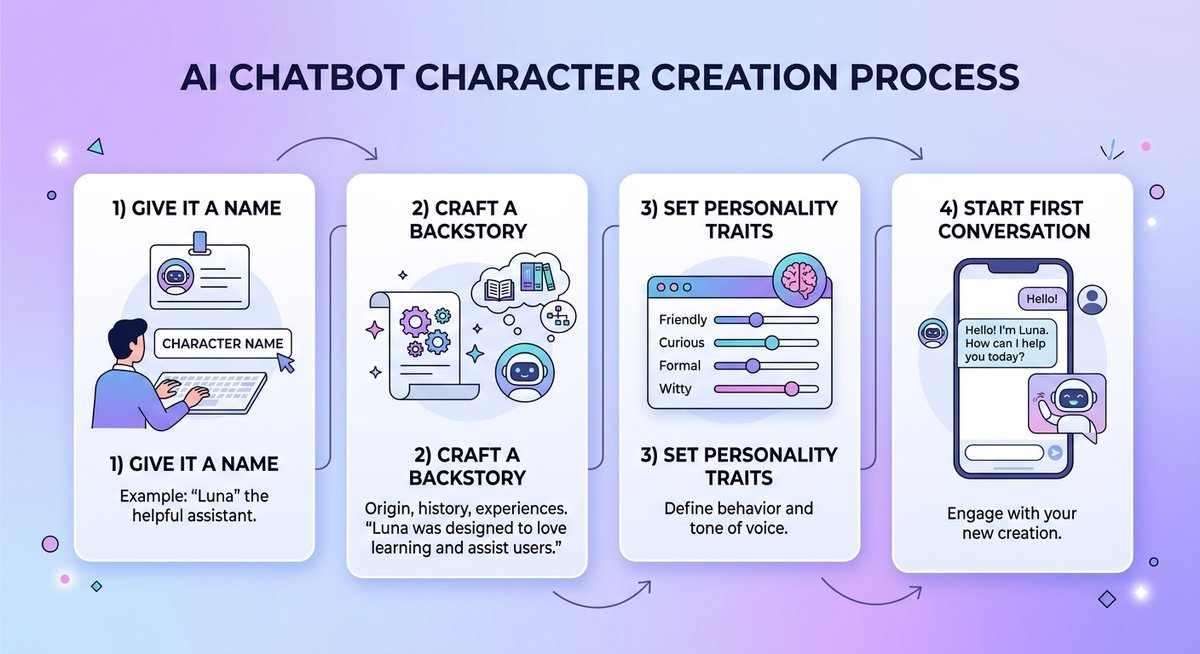
CrushOn AI’s character creation system offers depth that ranges from filling out a simple form to importing custom JSON configuration files. Even a basic character with a name, one-paragraph backstory, and a few personality traits produces functional results — but characters built with detailed instructions generate dramatically better conversations.
Basic Character Setup
- Name your character — Pick something specific. “Dark Elf Warrior” generates better responses than “Character 1” because the name gives the AI immediate context.
- Write a backstory — Two to three paragraphs covering personality, motivations, speech patterns, and relevant history. The more specific the detail, the more consistent the AI stays in character.
- Set personality traits — Use the trait selector to define behavioral tendencies. Conflicting traits (e.g., “shy” and “flirtatious”) can produce interesting dynamics but may reduce consistency.
- Create a greeting — The first message your character sends sets the conversational tone. Write it in your character’s voice and establish the scenario.
- Add example dialogue — Three to five sample exchanges teach the AI your character’s speech patterns, vocabulary, and response style. This is the single most impactful step for response quality.
- Configure scene cards — Scene cards define the environment and situation, giving the AI spatial and contextual awareness for more immersive responses.
Advanced: JSON File Import for Power Users
CrushOn AI supports importing character definitions via JSON files — a feature that sets it apart from most competitors. JSON imports allow users to define character parameters with granular precision that exceeds what the standard creation form offers. The format follows a structured schema covering personality arrays, behavioral rules, knowledge bases, and response formatting instructions.
According to the CrushOn AI wiki documentation, JSON import is particularly useful for users migrating characters from other platforms or for writers who maintain character sheets in structured formats. The import process accepts files through the character creation interface under “Advanced Options.” Characters imported via JSON can still be edited through the standard form after import.
Creating and Managing Multiple Characters
Free accounts support up to 10 character profile cards simultaneously, while paid plans increase this to 20 or more. Each character maintains an independent conversation history and memory context. Creating multiple characters is straightforward — repeat the creation process for each, and switch between active conversations through the chat list interface.
Group chat functionality (available on paid plans) allows multiple AI characters to interact within a single conversation thread. Setting up a group chat requires selecting two or more existing characters and defining a shared scene context. Group dynamics depend heavily on how distinct each character’s personality definition is — characters with overlapping traits tend to blend together in group scenarios.
The NSFW filter toggle is located in Chat Settings and controls whether conversations allow mature content. Disabling the filter unlocks unrestricted roleplay including explicit scenarios — the feature that drives most of CrushOn AI’s user base compared to filtered platforms like Character.AI.
- Open any active conversation or start a new one.
- Tap the Settings icon (gear) within the chat interface.
- Locate the NSFW Filter or Hidden Content toggle.
- Switch it to the Off position to enable unrestricted content.
- Confirm the age verification prompt if displayed.
Reddit threads on r/Crushon (2024) indicate the toggle name has changed across platform updates — it has appeared as “NSFW Filter,” “Hidden Content,” and “Content Filter” at different times. If the toggle is not visible, clearing the browser cache or updating the mobile app typically resolves the issue. Some users report that the toggle only appears after completing the initial account setup and verifying the age checkbox.

Tips for Content Filter Settings
Turning off the filter affects all conversations globally, not per-character. There is no way to enable NSFW for one character while keeping another character’s conversations filtered within the same account. Users who want both filtered and unfiltered experiences typically manage this by toggling the setting before switching conversations, though this is an acknowledged UX limitation the community has requested the platform address.
Text Formatting and Conversation Control
CrushOn AI supports several text formatting conventions that influence how the AI interprets and responds to messages. Understanding these conventions significantly improves interaction quality.
| Format | Syntax | Effect |
|---|---|---|
| Action/narration | *walks closer* | AI interprets as character action, responds with matching actions |
| Out-of-character | (( please be more descriptive )) | AI treats as instruction rather than in-character dialogue |
| Emphasis | **important word** | AI gives weight to emphasized terms in response |
| System instruction | [Write in first person] | Brackets signal formatting or behavioral instructions |
The re-roll feature allows regenerating any AI response that falls short of expectations. Manual message editing lets users modify both their own messages and AI responses within the conversation history — a powerful tool for steering narratives without breaking the flow. Writers using CrushOn AI for collaborative fiction particularly value editing as a way to maintain plot coherence.
Language Settings and Platform Accessibility
CrushOn AI’s interface supports multiple languages, changeable through the platform’s settings menu. Navigate to Account Settings, then select Language or Region preferences. The Classical CrushOn AI LLM offers the strongest multilingual conversation support, while Taurus and Sagittarius perform best for English-language roleplay.
For iOS users, CrushOn AI is accessible through the mobile browser at crushon.ai since the native app was removed from the Apple App Store. The web experience mirrors app functionality including character creation, chat history synchronization, and settings management. Adding crushon.ai to the home screen on iOS creates an app-like experience with full feature access.
Account Management: Deletion and Privacy
Deleting a CrushOn AI account requires navigating to Account Settings and selecting the delete option. According to the platform’s privacy policy, account deletion removes user-facing data but does not guarantee erasure of data already used for AI model training. Users concerned about data retention should request explicit data deletion through the platform’s support channels in addition to the in-app deletion function.
The text-to-speech feature, available on select models and tiers, converts AI responses into spoken audio. Quality varies by language and model, with English-language TTS producing the most natural results. TTS consumes additional message credits on some plans.
Frequently Asked Questions
How do you make a character on CrushOn AI?
Navigate to the character creation page, fill in the name, backstory, personality traits, greeting, and example dialogue fields. Adding scene cards and detailed example exchanges produces the highest quality AI responses. The full process takes five to fifteen minutes depending on detail level.
Can you use a temporary email to sign up for CrushOn AI?
Some temporary email services work for CrushOn AI registration, but account recovery becomes impossible if you lose access. Using a dedicated secondary email address provides better long-term account security than disposable options.
How do you delete a CrushOn AI account?
Go to Account Settings, scroll to the account management section, and select the deletion option. Previously used data may not be fully purged from AI training datasets, so supplement in-app deletion with a formal data erasure request if privacy is a priority.
Does CrushOn AI support text-to-speech?
Text-to-speech is available on select models and subscription tiers, converting AI responses to spoken audio. English-language TTS is the most polished, with other languages supported but at lower naturalness quality.
Getting the Most from CrushOn AI
The platform rewards users who invest time in character setup and learn its formatting conventions. Detailed backstories, specific example dialogue, and proper use of action markers and OOC instructions transform generic AI responses into genuinely engaging conversations. Model selection adds another layer of customization — matching Taurus for consistency-heavy storylines or Sagittarius for creative experimentation makes a tangible difference in output quality.
Most frustrations new users experience stem from underspecified character definitions rather than platform limitations. Spending an extra ten minutes on character creation pays dividends across every subsequent conversation. For issues that persist beyond character setup — crashes, errors, or loading failures — the troubleshooting guide covers common fixes organized by error type.