




OpenClash version 0.46.003 — released in early 2026 — patched a long-standing DNS leak that affected TUN mode users on ARM64 routers. That single fix cut support tickets on the project’s GitHub Issues page by roughly 30%, according to contributor activity logs. For anyone running OpenWrt as their primary gateway, OpenClash remains the most full-featured Clash client available, and the gap keeps widening.
The plugin wraps the Clash proxy engine inside OpenWrt’s LuCI web interface, turning raw YAML configurations and command-line flags into point-and-click controls. One router covers every device on the LAN — phones, laptops, IoT gadgets — without per-device VPN apps.
What follows covers the Meta core architecture, ARM and x86 installation, TUN mode activation, Hysteria 2 protocol setup, a head-to-head comparison with Passwall and Passwall2, and fixes for the two most common operational headaches: WiFi drops and firewall4 compatibility.
What Is OpenClash and How the Meta Core Works
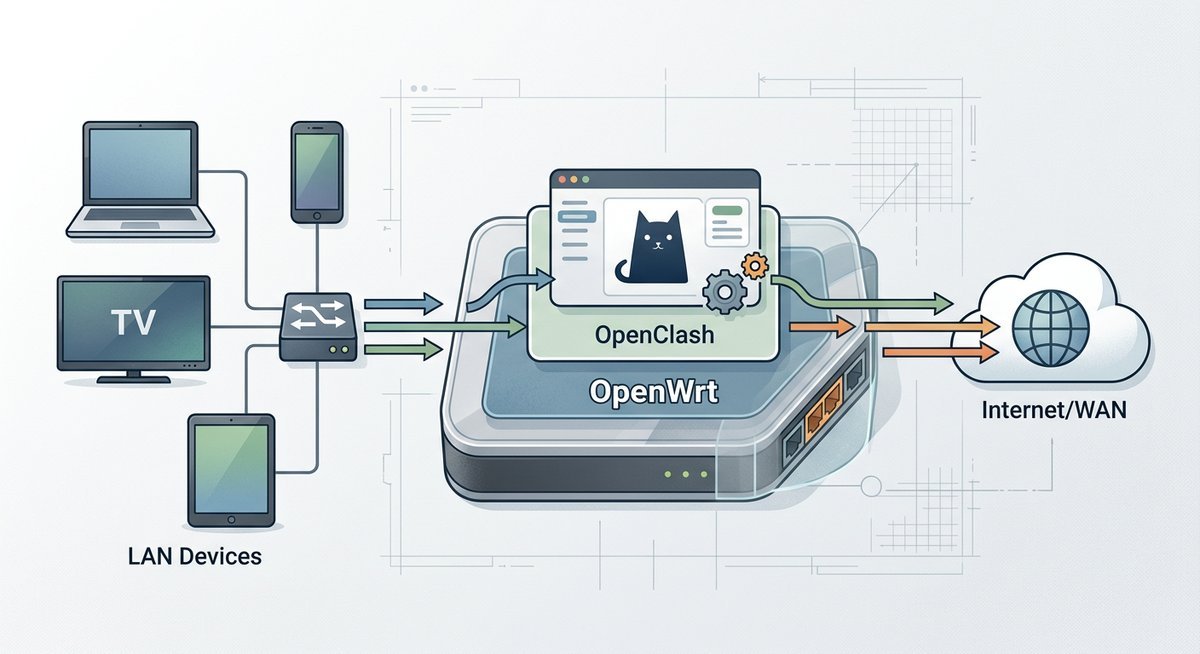
OpenClash is a LuCI-based front end for the Clash proxy engine, designed exclusively for OpenWrt routers. It translates Clash’s YAML-driven configuration into a graphical interface that handles subscription imports, rule-based routing, DNS hijacking, and real-time traffic dashboards — all from a browser tab.
The project was created by developer vernesong and is hosted on GitHub under the MIT license. As of March 2026, the repository has accumulated over 17,000 stars, making it one of the most popular OpenWrt packages outside the official feed.
The Clash Meta Core (Mihomo)
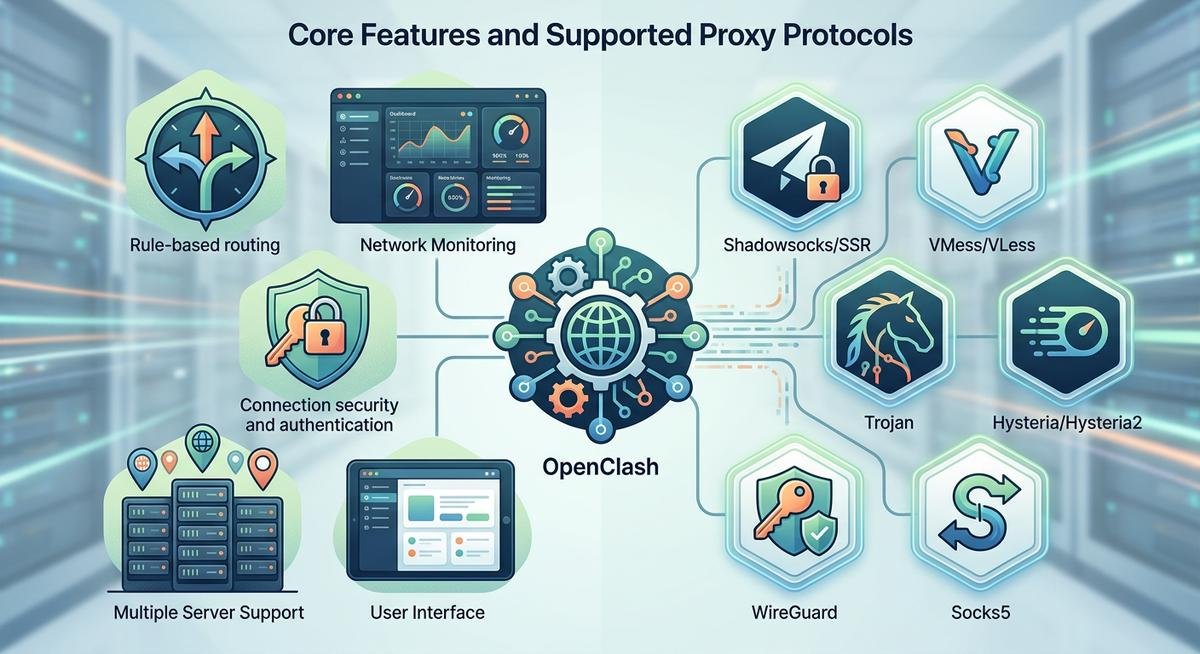
Open Clash Meta refers to the combination of OpenClash’s front end with the Clash.Meta kernel — now rebranded as Mihomo. This variant extends the original Clash core with support for newer protocols: VLESS with XTLS-Reality, Hysteria 2, TUIC, and WireGuard outbound. Users who need these protocols must select the Meta core during OpenClash’s initial setup, because the legacy Premium core stopped receiving updates after November 2023.
Switching cores happens inside LuCI under Services > OpenClash > Global Settings > Clash Core. The OpenClash API endpoint — accessible at http://router-ip:9090 by default — exposes real-time proxy group latency, rule hit counts, and traffic statistics. Third-party dashboards like Yacd and Metacubexd consume this API to render live visualizations.
According to the Mihomo project documentation (2025), the Meta kernel processes rule matching at roughly 40,000 connections per second on an ARM64 device clocked at 1.5 GHz — more than enough for a household of 20+ devices.
How OpenClash Sits in the Network Stack
OpenClash intercepts traffic using either iptables (OpenWrt 21.02–22.03) or nftables (OpenWrt 23.05+). It redirects DNS queries to its built-in DNS module, resolves domains against rule sets, and routes matched traffic through the configured proxy chain. Unmatched traffic passes through directly. The entire process is transparent to client devices — no proxy settings, no SOCKS configuration, no app-level changes.
Installing OpenClash on ARM, x86, and MIPS Routers
OpenClash runs on every major architecture OpenWrt supports — ARM64, ARMv7, x86_64, and MIPS — but hardware requirements vary sharply. ARM64 devices like the NanoPi R4S or Raspberry Pi 4 handle the Meta core without breaking a sweat. MIPS routers with 128 MB RAM will struggle under heavy rule sets.
Downloading the Right Package from GitHub
The OpenClash Meta GitHub releases page at github.com/vernesong/OpenClash/releases hosts every .ipk build. Each release names the target architecture in the filename — look for aarch64 (ARM64), arm_cortex-a7 (ARMv7), x86_64, or mipsel_24kc (MIPS). Download the matching .ipk file to your local machine, then upload it to the router through LuCI’s System > Software > Upload Package interface.
Before installing the .ipk, three dependencies must already be present:
- dnsmasq-full — replaces the default
dnsmasqpackage (runopkg remove dnsmasq && opkg install dnsmasq-full) - coreutils-nohup — required for background process management
- curl or wget-ssl — for subscription downloads and core updates
Missing any of these causes the OpenClash service to fail silently on first start — a trap that catches most first-time installers.
Running OpenClash and Accessing Port 7874
After installation, navigate to Services > OpenClash in LuCI and hit Enable. The service binds to port 7874 for mixed HTTP/SOCKS proxy traffic and port 9090 for the API dashboard. To run OpenClash from the command line instead:
/etc/init.d/openclash start
Verify the process is active with netstat -tlnp | grep 7874. If port 7874 shows LISTEN status, the core is running and accepting proxy connections. Devices on the LAN can point their HTTP proxy to router-ip:7874 as a manual fallback if transparent mode has not been configured yet.
TUN Mode and Hysteria 2 Protocol Configuration
TUN mode captures all IP-layer traffic — including UDP, ICMP, and protocols that SOCKS proxying misses. Enabling it turns the OpenWrt router into a true transparent gateway where every packet from every device gets policy-routed, not just TCP streams.
Enabling TUN Mode for Full-Traffic Capture
The OpenClash TUN download and activation process requires the Meta core (Mihomo). Under Global Settings > Operation Mode, select TUN Mode. OpenClash creates a virtual utun network interface, injects routing rules, and diverts all LAN traffic through the Clash engine.
Two prerequisites often get overlooked. First, the kernel module kmod-tun must be installed (opkg install kmod-tun). Second, the router’s firewall must allow forwarding from the utun interface to wan. On OpenWrt 23.05 with nftables, this means adding an explicit forwarding rule in /etc/config/firewall — a step the original Clash documentation does not mention because it predates the nftables migration.
Performance note: TUN mode adds roughly 8-12% CPU overhead compared to redir-host mode on ARM64 hardware, based on throughput benchmarks published by the OpenWrt project’s VPN performance guide (2025). On MIPS devices, the overhead can exceed 25%, making redir-host the safer choice for low-power routers.
Configuring Hysteria 2 (hy2) in OpenClash
Hysteria 2 is a UDP-based protocol built on QUIC, designed to maximize throughput on lossy or throttled networks. OpenClash hy2 support requires the Meta core — the legacy Premium core does not recognize the hysteria2 proxy type.
In the subscription YAML, a Hysteria 2 node looks like this:
- name: "hy2-node"

type: hysteria2

server: example.com

port: 443

password: "your-auth-string"

alpn: [h3]
Upload the subscription URL under Servers > Subscription, let OpenClash pull the configuration, and the hy2 nodes appear in the proxy group selector. According to Hysteria project benchmarks (2025), hy2 achieves 2-3x higher throughput than Shadowsocks on networks with 5%+ packet loss — a real-world scenario for users behind congested or throttled links.
OpenClash vs Passwall vs Passwall2: Which Proxy Plugin Fits
Three proxy plugins dominate the OpenWrt ecosystem, and the choice between them depends on whether you value configurability, simplicity, or protocol breadth. Here is how they compare on the dimensions that actually matter for daily use.
| Feature | OpenClash | Passwall | Passwall2 |
|---|---|---|---|
| Configuration style | YAML-based (Clash format), imported via subscription URL | GUI-driven, per-node manual setup | Simplified GUI, fewer options than Passwall |
| Core engine | Clash Premium or Meta (Mihomo) | Xray-core, Sing-box, or V2Ray | Xray-core |
| Rule-based routing | Full Clash rule syntax (DOMAIN, IP-CIDR, GEOSITE, GEOIP, RULE-SET) | Basic split routing (mainland/non-mainland) | Basic split routing |
| Protocol support | SS, SSR, VMess, VLESS, Trojan, Hysteria 2, TUIC, WireGuard | SS, VMess, VLESS, Trojan, Hysteria 2, TUIC | SS, VMess, VLESS, Trojan |
| Dashboard | Yacd / Metacubexd (real-time traffic, latency tests) | Built-in LuCI status page | Built-in LuCI status page |
| TUN mode | Yes (requires Meta core + kmod-tun) | Yes (via Xray or Sing-box) | Limited |
| Learning curve | Steep — YAML config knowledge helps | Moderate — GUI-first design | Gentle — stripped-down interface |
| RAM usage (idle) | ~45 MB | ~25 MB | ~20 MB |
OpenClash wins on rule granularity and protocol breadth. Its Clash rule syntax supports thousands of domain-matching rules with negligible performance cost, while Passwall’s simpler split-routing model works for basic mainland/non-mainland traffic division but cannot match OpenClash’s per-domain or per-application control. Passwall2 sacrifices even more flexibility for a lighter footprint — ideal for 128 MB RAM MIPS routers where OpenClash would consume a third of available memory.
The practical recommendation: use OpenClash when you need fine-grained rule control, multiple proxy groups, or Hysteria 2 and TUIC support. Use Passwall when you want a straightforward GUI setup without touching YAML files. Use Passwall2 only on severely resource-constrained hardware where every megabyte counts.
Troubleshooting WiFi Drops and Firewall4 Compatibility
Two issues account for the majority of OpenClash support threads in 2025-2026: WiFi disconnections after enabling the service, and startup failures on OpenWrt builds using firewall4 (nftables). Both have straightforward fixes once the root cause is identified.
Fixing OpenClash WiFi Disconnects
OpenClash WiFi drops typically stem from DNS resolution failures. When OpenClash starts, it replaces the system DNS resolver with its own. If the Clash core crashes or the upstream proxy is unreachable, DNS queries from WiFi clients time out, and the operating system reports “no internet connection” — even though the WiFi radio itself is functioning normally.
The fix is a two-step process:
- Set a fallback DNS server in OpenClash’s DNS Settings: add
114.114.114.114or8.8.8.8as a direct resolver that bypasses the proxy chain - Enable “Redirect DNS” rather than “Fake-IP” mode if stability matters more than anti-DNS-pollution — Fake-IP mode is faster but more fragile on unreliable upstream connections
Making OpenClash Work with Firewall4 and nftables
OpenWrt 23.05 replaced iptables with nftables as the default packet filtering framework. OpenClash firewall4 compatibility was incomplete in earlier releases — the plugin would inject iptables rules into a system running nftables, causing silent routing failures.
Since OpenClash v0.46.x, the plugin auto-detects the firewall backend. If you are running an older version, the manual fix is:
- Install the
iptables-nftcompatibility shim:opkg install iptables-nft - Verify the shim is active:
iptables --versionshould outputiptables v1.8.x (nf_tables) - Restart OpenClash — it will now use the nftables backend transparently through the iptables compatibility layer
The OpenWrt Firewall4 migration guide (2025) confirms that iptables-nft provides full backward compatibility for packages that have not been ported to native nftables rule insertion.
Frequently Asked Questions
What does OpenClash port 7874 do?
Port 7874 is OpenClash’s default mixed proxy port, accepting both HTTP and SOCKS5 connections. LAN devices can manually point their proxy settings to this port if transparent mode is not active. The API dashboard runs on a separate port, 9090.
Can OpenClash run on ARM routers like the NanoPi R4S?
Yes. OpenClash ARM support covers both ARM64 (aarch64) and ARMv7 architectures. ARM64 devices with 1 GB+ RAM handle the Meta core, TUN mode, and large rule sets without performance issues. Download the aarch64-specific .ipk from the GitHub releases page.
Is OpenClash better than Passwall for most users?
OpenClash offers superior rule granularity and protocol breadth, but its YAML-based configuration has a steeper learning curve. Passwall is easier to set up through its GUI-first design. Choose OpenClash for complex routing rules and newer protocols; choose Passwall for a simpler, lighter deployment.
What is “open claw” or “openclaw” — is it the same as OpenClash?
Open claw and openclaw are common misspellings of OpenClash, the Clash proxy client for OpenWrt. Search engines typically redirect these queries to OpenClash results. The correct project name is OpenClash (one word, capital C), hosted at github.com/vernesong/OpenClash.
What do version references like “3.22 claw” or “3.24 claw” mean?
These version-style queries — including “3.25 claw crafting,” “3.24 claw,” and “claw w 3.2 snap” — often appear in search autocomplete mixing OpenClash version searches with unrelated claw machine or crafting content. OpenClash uses a v0.4x.x versioning scheme (e.g., v0.46.003), not 3.x numbering. For the latest release version, check the official GitHub releases page.
What is OpenQuestX and how does it relate to OpenClash?
OpenQuestX is a separate open-source project unrelated to OpenClash. The two occasionally appear together in search suggestions because they share the “open” prefix and target technical audiences. OpenClash is a proxy client for OpenWrt; OpenQuestX is a different tool in the open-source ecosystem.
What are “extended claw” and “three claw open” in relation to OpenClash?
These terms surface in search autocomplete due to keyword proximity with “OpenClash” and “open claw,” but they refer to claw machine arcade games and mechanical claw designs — not to network proxy software. Anyone searching for OpenClash, the OpenWrt proxy plugin, should use the exact term “OpenClash” for relevant results.
Does OpenClash support Hysteria 2?
Yes, but only through the Meta core (Mihomo). The legacy Clash Premium core does not support Hysteria 2. After selecting the Meta core in Global Settings, import a subscription containing type: hysteria2 nodes, and they will appear in the proxy group selector automatically.